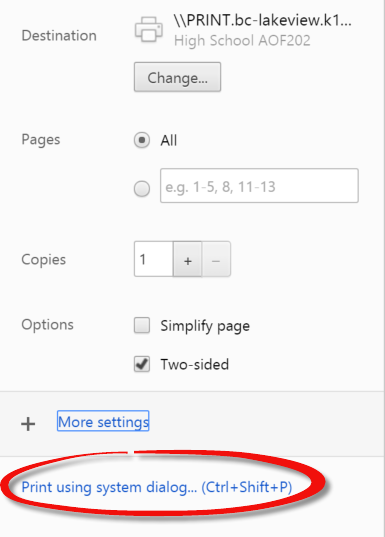
 When printing from Google Docs, the only options that are immediately available are which pages you’d like to print, how many copies you’d like, and the ability to print two sided (assuming you’re using a printer that is able to do two sided copies). If you want advanced features, you have to choose Print using system dialog… (Ctrl + Shift + P) from the Print page. Choosing this option will take you to the print options that you see when you print from word processing programs such as Microsoft Word.
Showing posts with label printing. Show all posts
Showing posts with label printing. Show all posts
Monday, February 22, 2016
Using Advanced Printing Options From Google Docs
When printing from Google Docs, the only options that are immediately available are which pages you’d like to print, how many copies you’d like, and the ability to print two sided (assuming you’re using a printer that is able to do two sided copies). If you want advanced features, you have to choose Print using system dialog… (Ctrl + Shift + P) from the Print page. Choosing this option will take you to the print options that you see when you print from word processing programs such as Microsoft Word.
Subscribe to:
Posts (Atom)